Find the shortcut to the program you want, quickly!

Each time you start programs from the Start menu, you use an interface that has not changed in 10 years! No wonder it has become more difficult to use as the number of programs has increased...

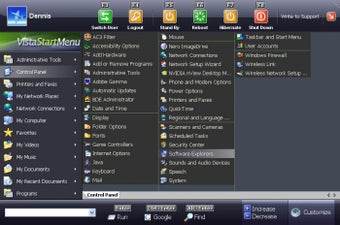
Vista Start Menu is a completely different approach to the interface. In the process of development we were oriented towards how people perceive information and also towards the ability to remember the position of items.

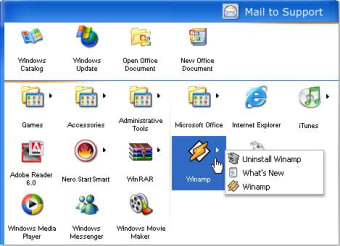
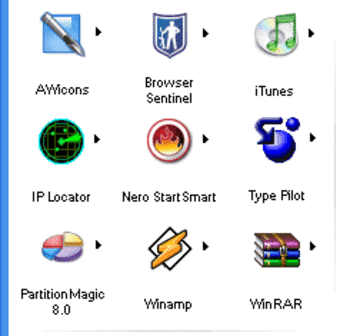
All you see in the standard menu is a long list and you have to read most names in order to find the program you need. Vista Start Menu shows the icons of the program that is why it is much easier to find the program you need with one glance. Besides, the programs are arranged in a table visually divided into sections, which also contributes to finding what you need quickly.

With Vista Start Menu, you just open the menu and click the program icon. If you need supplemental files installed together with the program, just move the mouse pointer over the icon and you will see a submenu where you can find all you need. Vista Start Menu retains the position of icons that is why when you install or remove programs, icons remain in their places. You do not have to spend time on looking for icons that have "slid away" as it usually happens in the standard menu.


 0/3

App specs

  • License

    Free

  • Version

    6.7.2
  • Latest update

  • Platform

    Windows

  • OS

    Windows 2000

  • Language

    English

    Available languages

    • Arabic
    • Czech
    • Danish
    • German
    • English
    • Spanish
    • Finnish
    • French
    • Italian
    • Japanese
    • Korean
    • Dutch
    • Norwegian
    • Polish
    • Portuguese
    • Russian
    • Swedish
    • Turkish
    • Chinese
  • Downloads

    14.7K

    Last month's downloads

    • 5
  • Size

    12.79 MB

  • Developer

Program available in other languages


User reviews about Vista Start Menu

3.2

1 reviews

Add review

Main reviews for you

  • Anonymous user

    Just what I needed. With this little sotfware now is more easy for me find the program inside the start menu. It's fast and easy to install. Also it's simple to configure and customize.


More

You may also like

Alternatives to Vista Start Menu

Explore Apps

Latest articles

Laws concerning the use of this software vary from country to country. We do not encourage or condone the use of this program if it is in violation of these laws.
Softonic

Is Vista Start Menu safe?

100/100

Score result: Clean

This file passed a comprehensive security scan using VirusTotal technology. It is safe to download.

  • Virus free
  • Spyware free
  • Malware free
  • Verified by Security Partners

    VirusTotal logo

Scan Info

Last scan
Wednesday, June 12, 2024
Scan provider
VirusTotal · Full report

File Integrity

File
Vista_Start_Menu_V6.7.2.exe
SHA256
0ae8f8e6a1a90e326a0207f495f890f617ce1fdf824f2a179ba8e1836847ac5e
SHA1
68c0c873cf13fad567d985b395df73be519ae406

Softonic security commitment

Vista Start Menu has been thoroughly scanned by our advanced security systems and verified by industry-leading partners. This file comes from the official developer and has passed all our security checks, showing no signs of viruses, malware, or spyware. For more information, visit our Security and Trust Center